

The Social Security System (SSS) has introduced a new facial authentication system with liveness check to make the Annual Confirmation of Pensioners (ACOP) easier and more convenient for pensioners.
With this new feature, eligible pensioners can confirm their identity online using a quick facial scan, eliminating the need to travel to an SSS branch just to comply with ACOP requirements.
This digital upgrade is part of the government’s effort to improve services and make transactions faster and more accessible—especially for elderly pensioners and those living abroad.
In this guide, you will learn:
- What the SSS facial authentication system is
- Who can use the new ACOP facial verification
- Step-by-step instructions to complete ACOP online
- Important reminders for pensioners
What is the SSS ACOP Program?
The Annual Confirmation of Pensioners (ACOP) is a requirement where SSS pensioners must confirm their status every year to ensure they remain eligible to receive their monthly pension.
This process helps SSS verify that the pensioner is still alive and qualified to receive benefits. If a pensioner fails to comply with ACOP, their monthly pension may be suspended until compliance is completed.
Pensioners Required to Comply with ACOP
The following pensioners are required to complete ACOP:
- Retirement pensioners aged 80 years old and above living in the Philippines
- Retirement pensioners residing abroad
- Total disability pensioners
- Survivorship (death) pensioners
- Dependent children under guardianship
SSS Facial Authentication with Liveness Check
In March 2026, SSS launched a facial authentication feature that allows pensioners to complete ACOP online using a camera-enabled device such as a smartphone, tablet, or computer.
This system uses biometric liveness verification, which confirms that a real person is present during the facial scan and prevents fraud.
According to SSS, the verification process usually takes less than one minute and automatically updates the pensioner’s records once completed.
Another advantage is that pensioners do not need to log in to their My.SSS account to use this feature.
Who Can Use the Facial Authentication ACOP?
The new system is available to pensioners registered with the Philippine Identification System (PhilSys) or the National ID system.
Eligible users include:
- Retirement pensioners aged 80 and above in the Philippines
- Retirement pensioners living abroad
- Survivorship pensioners
If a pensioner does not have a compatible device or internet access, they may still seek help at SSS branch E-Centers or comply through traditional methods such as personal appearance or video conference.
Step-by-Step Guide: How to Submit ACOP Through Facial Authentication
Follow these simple steps to complete ACOP using facial authentication.
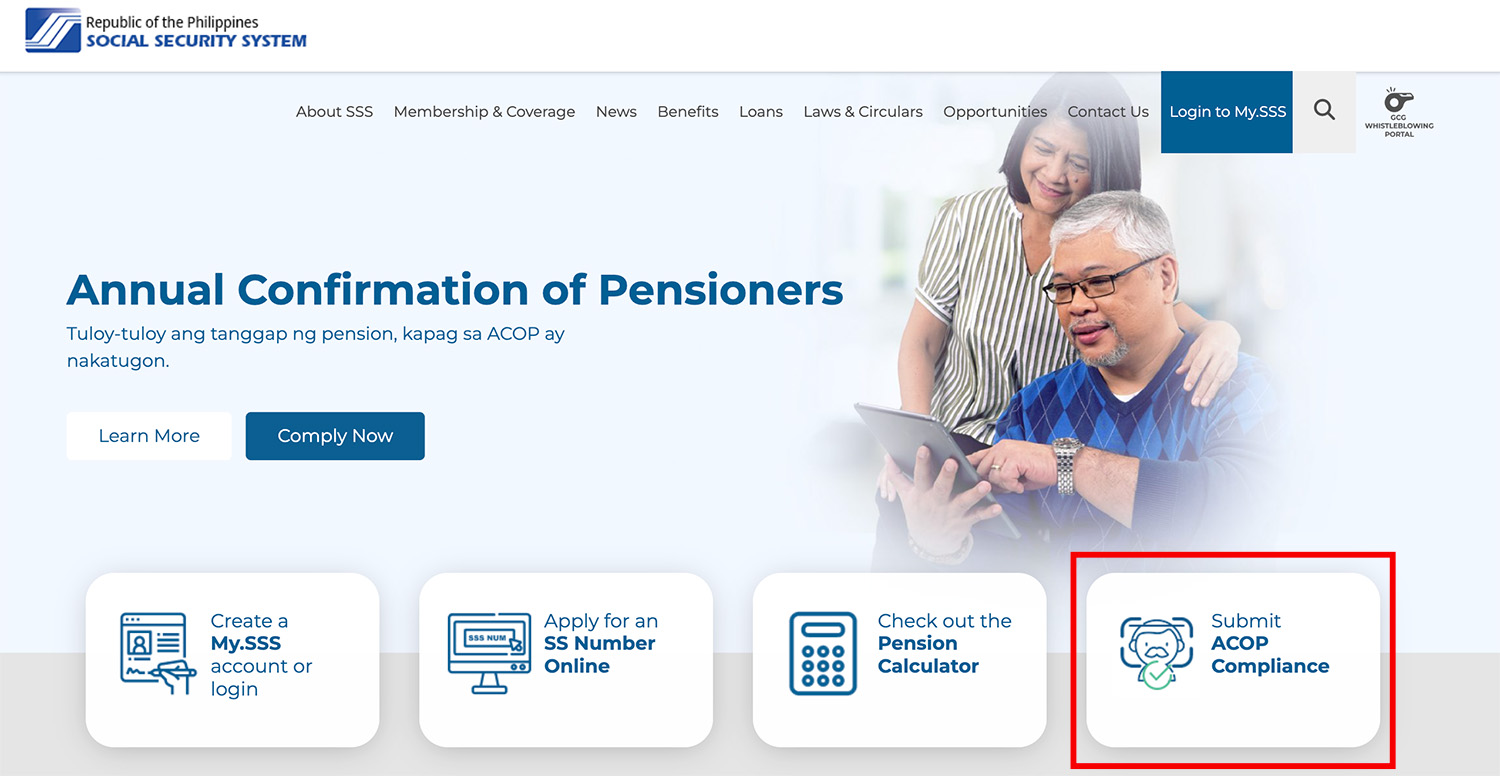
Step 1: Visit the SSS Website
Go to the official website of the Social Security System. On the homepage, click “Submit ACOP Compliance.”
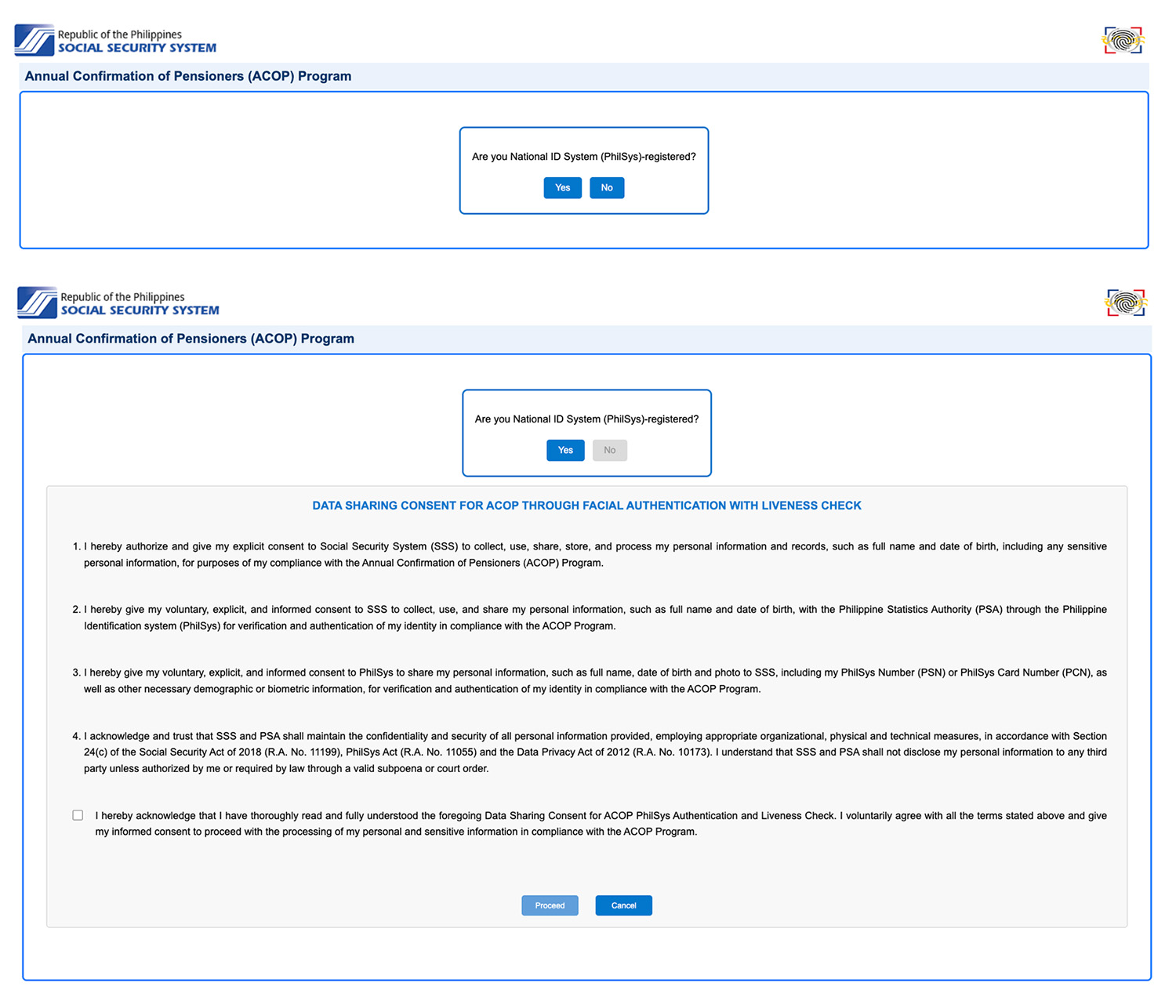
Step 2: Confirm National ID Registration
You will be asked if you are registered in the National ID (PhilSys).
Tick the box on the Data Sharing Consent and Undertaking page to proceed.
Step 3: Enter Your SSS Information
Provide the following details:
- SS Number
- Date of Birth
Then click Submit.
Step 4: Confirm Your Identity
The system will display your name.
Check if the details are correct and click “Yes.”
Step 5: Additional Confirmation for Survivorship Pensioners
If you are a survivorship pensioner, you will be asked to confirm whether you have remarried or not.
Step 6: Start the Liveness Facial Scan
You will be redirected to the PhilSys authentication page.
Before taking the scan:
- Read the instructions carefully
- Ensure your camera is working
- Make sure your face is clearly visible
Click “Start Liveness” and follow the instructions for the facial scan.
Step 7: Receive Confirmation
Once the verification is successful, a confirmation page will appear.
You may:
- Take a screenshot
- Print the confirmation page
This will serve as proof of your ACOP compliance.
Advantages of the New SSS Facial Authentication System
The new ACOP facial authentication feature provides several benefits for pensioners:
- No Need to Visit SSS Branch. Pensioners can complete ACOP from the comfort of their home, saving time and transportation costs.
- Faster Verification. The entire process takes less than a minute in many cases.
- Improved Security. The liveness check technology ensures that the person completing the verification is actually present.
- Convenient for OFWs and Pensioners Abroad. Filipinos living abroad no longer need to schedule in-person verification.
What If Facial Authentication Fails?
If the system cannot verify your identity, SSS may display an authentication error.
In this case, you can still comply with ACOP using other methods such as:
- Personal visit to an SSS branch
- Video conference appointment
- Sending documents by email or mail
- Assistance through SSS E-Centers
Important Reminders for Pensioners
Here are some tips to avoid problems when completing ACOP online:
- Make sure you are registered in the National ID system.
- Use a device with a working camera.
- Perform the facial scan in a well-lit area.
- Follow the instructions carefully during the liveness check.
- Save the confirmation page as proof of compliance.
Also remember that ACOP compliance is usually required during the pensioner’s birth month, so it is best to complete it early to avoid suspension of pension payments.
The launch of facial authentication for SSS pensioners is a major step toward digital government services in the Philippines. By allowing pensioners to complete ACOP through a quick facial scan, the Social Security System helps reduce travel, waiting time, and inconvenience—especially for senior citizens.
With this system, pensioners can now confirm their eligibility anytime and anywhere, ensuring that their monthly pension continues without interruption.
As more government services move online, innovations like this will make transactions easier and more accessible for millions of Filipinos.
Read Also: How to Check Your SSS Contributions Online